Scan text where you read it.
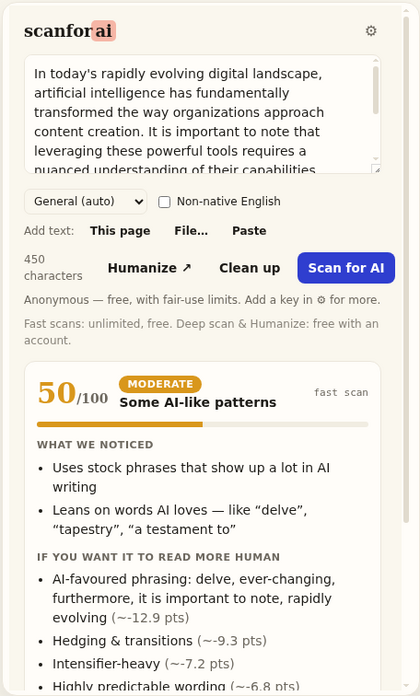
You’re reading an article, an essay, a review — and something feels off. Highlight it, right-click, and see in seconds how strongly it reads AI-written, with the reasons spelled out in plain English right in the popup.
No more copying text into another tab: scan the whole page in one click, check a link before you even open it, paste a URL, or drop in a Word or PDF file. Fast and deep scans are free with no account, and anonymous scans are never stored.
Also runs on Brave, Opera, Vivaldi and Arc — see every supported browser.
Where it runs.
Three store listings cover every browser below. Edge and Firefox have their own, and every other Chromium browser installs the Chrome listing directly — same extension, same automatic updates, nothing to sideload.
Not supported yet: Safari, which needs a separately packaged build we haven’t shipped. Phones and tablets aren’t either — Chrome and Edge don’t allow extensions on mobile at all. On a phone, use scanforai.com directly; it does everything the popup does.
Everything it does.
Scan anything you can see
Highlight a paragraph and right-click it. Scan the whole page with one click. You can even right-click a link and check the article behind it before you open it.
Files too
Got a Word file or a PDF instead of a web page? Drop it straight into the popup — we pull the text out and scan it exactly like a paste.
Reasons, not verdicts
Every score comes with what actually stood out — the phrases, the rhythm, the patterns — so you can judge the evidence yourself. Never a “this IS AI” stamp, because no honest tool can promise that.
Clean up in place
Long dashes, curly quotes and invisible characters give pasted AI text away. Clean them up without changing a single word, straight from the popup.
Fair to second-language writers
People who write in a second language get falsely flagged by AI detectors all the time. Tell the extension the text is second-language writing — or pick its type — and the scoring adjusts instead of firing blind.
Free and private
Fast scans are unlimited with no account. The extension does nothing until you click, sends only the text you chose to scan. Anonymous scans are never stored; signed in, your scans are saved to your history.
One click connects your free account.
The extension works with no account at all, deep scans included. Signing in from its settings raises your hourly deep scan limit once your email is verified, runs deep scans on uploaded files too, saves your scans to your history and shows your monthly deep-scan count. Your password never touches the extension: the sign-in happens on scanforai.com, which hands back a key of its own.
That key is yours to manage — see it, rename it or revoke it any time under API keys in the dashboard. A revoked key stops working at once; remove it from the extension’s settings to scan anonymously again. The extension privacy note spells out exactly what is sent and when.
How it connects
- Open the extension’s settings
- Click Sign in with ScanForAI — the approval happens on this site
- A revocable key named “Extension (auto)” is created on your account
Free account, no card. Revoke under API keys.
Extension questions.
Is there a browser extension that detects AI text?
Yes — the ScanForAI extension scans any selection, whole pages, linked pages and uploaded files (.docx, .pdf, .txt and more), and returns a 0–100 AI-writing score with the reasons in plain English. It is live on the Chrome Web Store, Microsoft Edge Add-ons and Firefox Add-ons.
Which browsers does it support?
Chrome, Microsoft Edge, Firefox 121+, Brave, Opera and Opera GX, Vivaldi, Arc and other Chromium builds — the full list is above. Edge and Firefox have their own store listings; every other Chromium browser installs the Chrome Web Store listing directly. Safari is not supported, and no desktop browser’s extensions run on phones or tablets.
Will it work inside Google Docs?
Partly. Google Docs draws its editor on a canvas, so no extension can read a Docs selection directly. The popup’s Paste button bridges it: copy in Docs, click Paste in the extension, and the scan runs — one extra keystroke.
Does the extension read my browsing?
No. It does nothing until you trigger it on a selection or a page and sends only that text to the same API the site uses. Anonymous scans are never stored; if you sign in, your scans are saved to your history. The engine stays on our servers; the extension is a thin client by design.
What does it cost?
Fast scans, deep scans and clean-ups are free and anonymous — no signup; deep scans have an hourly limit. A free account, connected with one click from the extension’s settings, raises that limit and adds deep scans on uploaded files.
Why does it ask for permissions like reading the page?
Every permission maps to a button you press. “Read the page” powers This page and is granted per click on the active tab only; the clipboard permission powers the Paste bridge for Google Docs; sign-in uses the browser’s identity flow; storage holds your key locally. Nothing runs in the background and nothing is collected while you browse.
Is there a keyboard shortcut?
Ctrl+Shift+S (Cmd+Shift+S on Mac) opens the popup anywhere. You can change the binding on your browser’s extension-shortcuts page.
Can I use my own API key instead of signing in?
Yes. Settings accepts any key from your dashboard (it starts with at_sk_). The sign-in button just automates creating one — same result, one click instead of a copy-paste.